

What it is
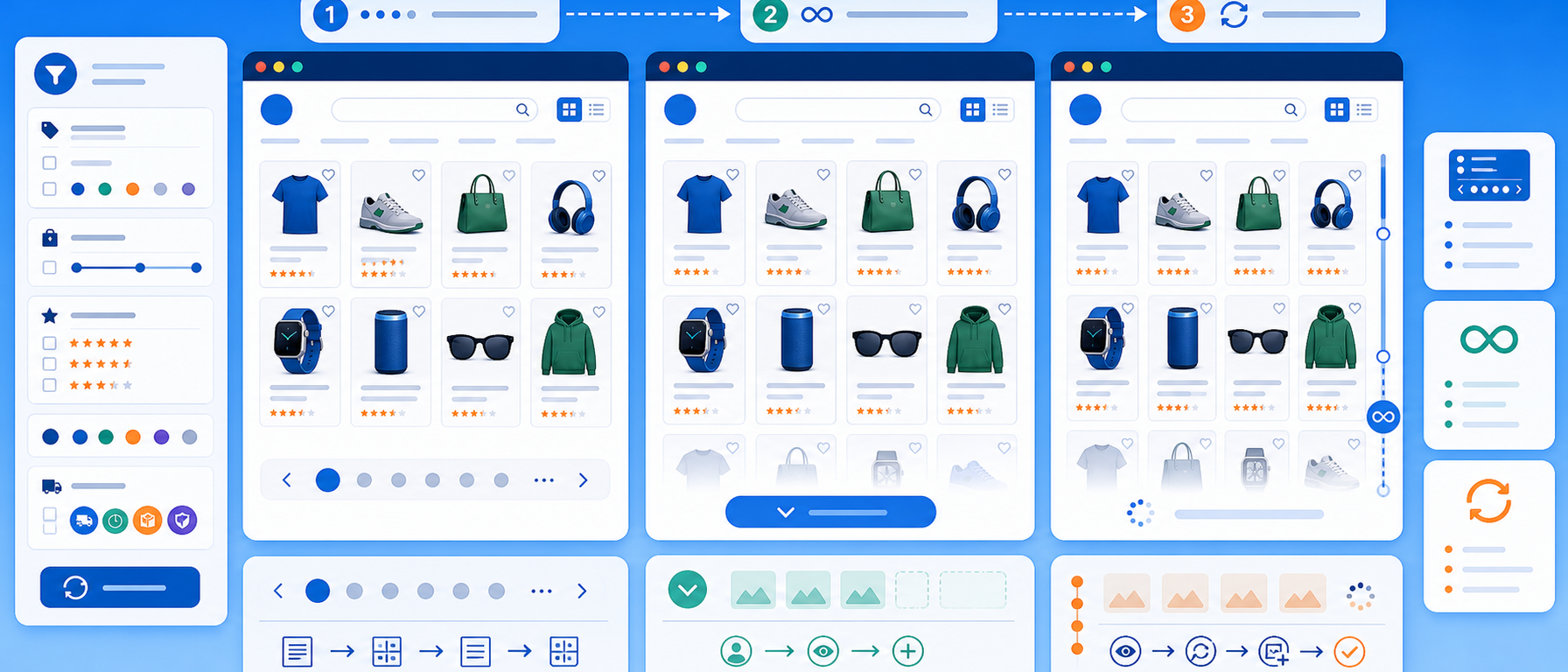
The Product List Pagination module replaces the default PrestaShop pagination with a fully configurable three-mode system.
Visitors browse the catalogue with numbered pages, a "Load More" button or infinite scroll, depending on the mode you choose.
You set the number of products per page or load, the button text and the behaviour per device type.
Why the pagination mode matters
The way visitors browse your catalogue affects their experience and the number of products they see. Each mode has different strengths:
- Classic Pagination: each page is a separate URL that Google can index, with correct canonical URLs
- Load More: the user controls when more products load and the interaction is touch-friendly on mobile
- Infinite Scroll: products load continuously as the user scrolls, like a social media feed
Key features
1. Classic Pagination: numbered pages
Traditional numbered pagination (1, 2, 3...), enhanced. Users move quickly to any page. Suited to:
- Stores with large product counts where users search for something specific
- Users who want to remember which page they were on
2. Load More Button: on-demand loading
A "Load More" button appends new products below the existing ones, without a page reload. Suited to:
- Mobile experience, with touch-friendly interaction
- Stores that want users to scroll but control when more loads
- A balance between user experience (UX) and server load
3. Infinite Scroll: endless browsing
Products load automatically as the user scrolls down, with no clicks and no interruption. Suited to:
- Fashion, lifestyle and other visually driven stores
- Stores that want visitors to stay on the page as long as possible
- Mobile-first experiences similar to a social media feed
Full configuration
- Number of products per page or load
- Apply to category pages, search results and tag pages
- Customise button text
- Responsive behaviour per device type
Use cases
- Large catalogues where users look for something specific: Classic Pagination
- Stores with mobile users who want control over loading: Load More
- Fashion and lifestyle stores with visual browsing: Infinite Scroll
Benefits for the merchant
You choose the mode that fits your catalogue and your visitors, and adjust it without code. You control the browsing experience across categories, search results and tag pages, with separate settings for behaviour per device type.
Who it is for
Every PrestaShop store that wants to improve catalogue browsing, whether for UX, SEO or mobile optimisation reasons.
Frequently asked questions
Which pagination modes does the module offer?
Three: Classic Pagination (numbered pages), Load More Button and Infinite Scroll.
Which mode suits SEO?
Classic Pagination, where each page is a separate URL that can be indexed, with correct canonical URLs.
Where does it apply?
On category pages, search results and tag pages.
What can I configure?
The number of products per page or load, the button text and the responsive behaviour per device type.
Get in touch
If you are interested in the Product List Pagination module, or would like to discuss which pagination mode fits your store, contact us. We are here to help you find the best solution for your online store. You can also call us on +30 215 215 1362.